en es

What Is a Fiber HDMI Cable and How Does It Work?

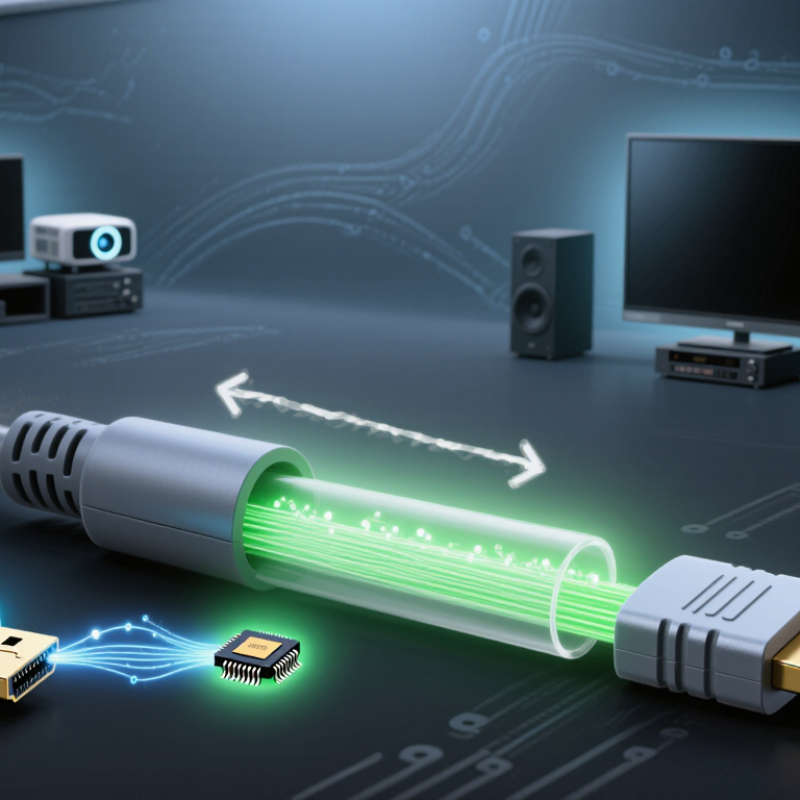
A Fiber Hdmi Cable carries high-definition audio and video through optical fibers instead of relying only on copper conductors. Inside the cable, tiny transmitters convert HDMI electrical signals into pulses of light. A receiver then changes those pulses back into HDMI signals for the television, monitor, or projector. The process feels almost invisible. The picture simply appears.

This design matters over long distances. Copper HDMI cables can lose signal strength as length increases, especially with 4K, 8K, high refresh rates, and HDR. Fiber models can support longer installations with less electromagnetic interference from power lines, lighting systems, and nearby equipment. The HDMI Forum’s HDMI 2.1 specification supports features such as 48Gbps bandwidth, 8K resolution, and dynamic HDR. Meanwhile, Grand View Research reports continued growth in the global fiber-optics market, driven by expanding data traffic and high-speed connectivity needs. These figures do not prove every Fiber Hdmi Cable performs equally. They only show the wider technology trend.

Chandlee Harrell, President of the HDMI Forum, has stated, “The HDMI 2.1 Specification continues to enable higher video resolutions, refresh rates, and bandwidth.” That principle explains why optical HDMI products attract home theater designers and professional installers. However, compatibility remains easy to underestimate. Directional cables may require correct source and display ends. Some models also need power from the HDMI port. A perfect cable does not exist. Installation quality still matters. A loose connector, sharp bend, or unsupported feature can produce a blank screen. This guide examines how Fiber Hdmi Cable technology works, where it performs best, and where expectations should remain realistic.

What Is a Fiber HDMI Cable and How Does It Work?

What a Fiber HDMI Cable Is: HDMI 2.1 Supports Up to 48 Gbps

A fiber HDMI cable sends high-speed HDMI signals through optical fiber instead of relying mainly on copper conductors. It is lighter and often more effective over long distances. HDMI 2.1 supports up to 48 Gbps through its FRL transmission system. This bandwidth can carry demanding formats, including 4K at 120 Hz and 8K at lower frame rates. “Up to” matters here. Actual performance depends on the source, display, resolution, color settings, and cable design.

Inside the cable, a transmitter converts electrical HDMI data into pulses of light. A receiver changes those pulses back into an electrical signal for the screen. Many fiber HDMI cables are active and directional. Check the source and display labels before installation. Some models also include copper wires for power, control signals, and audio return functions. The optical section does not automatically improve picture quality. It mainly helps preserve signal integrity across longer runs.

In practical use, a fiber cable can remain stable beside power cables and inside a long wall conduit. It also needs a wider bend radius than people expect. Sharp folds may damage its internal fibers. I once treated the cable like ordinary copper, which was careless. A gentle loop worked better. The cable should still be tested with the complete setup, especially when enabling 48 Gbps features. A shorter cable may perform more reliably than a poorly installed long one.

How HDMI Signals Are Converted into Light for Long-Distance Transmission

A fiber HDMI cable carries video as light rather than electrical pulses. Inside the transmitter, a serializer organizes HDMI data into high-speed optical signals. A laser or VCSEL then flashes through the fiber core. At the receiving end, a photodiode converts those flashes back into electrical data. The display receives them as ordinary HDMI signals. Light travels differently.

This conversion reduces electromagnetic interference and limits signal loss over long distances. ITU-T G.652.D specifies single-mode fiber attenuation near 0.4 dB per kilometer at 1310 nanometers. HDMI timing still matters, however. The cable must preserve clock recovery, content protection, and display-identification data. A weak receiver or poor connector can cause black screens, sparkles, or intermittent sound. The theory is clean; installations are not.

Industry demand makes this design increasingly practical. The Cisco Annual Internet Report forecast video traffic would represent 82% of consumer internet traffic by 2022. That figure shows why stable, high-bandwidth links matter in venues, control rooms, and home theaters. Fiber can support long runs with slim cables, but it is not automatically stronger. Tight bends, contaminated ends, and insufficient optical power remain real risks. Field technicians often inspect connectors twice. Even then, a flawless cable can fail beside a poorly configured source.

What Is a Fiber HDMI Cable and How Does It Work?

How HDMI Signals Are Converted into Light for Long-Distance Transmission

Data Dimension Fiber HDMI Cable Traditional Copper HDMI Cable Key Technical Fact
Basic Definition An active HDMI cable that uses optical fiber to carry high-speed video and audio data over long distances. A passive or active cable that carries HDMI electrical signals through copper conductors. Fiber HDMI cables normally include electronic components inside one or both connectors.
Signal Form Inside the Cable HDMI electrical data is converted into optical pulses, transmitted as light, and converted back into electrical data at the display end. The HDMI data remains in electrical form throughout the cable. Optical transmission reduces the effect of electromagnetic interference on the signal path.
Conversion Process Electrical HDMI signal → electrical-to-optical conversion → light transmission → optical-to-electrical conversion → display output. Source device → copper conductors → display device, with no optical conversion. The conversion is performed by transceiver circuitry integrated into the cable assembly.
Common Fiber Type Usually uses multimode optical fiber for short- to medium-distance consumer and professional installations. Uses copper conductors, commonly arranged as twisted pairs for high-speed differential signaling. The actual fiber type and construction vary by cable design and rated performance.
Typical Long-Distance Advantage Can maintain high-speed HDMI signals over distances that may be difficult for passive copper cables. Performance generally decreases as cable length increases, especially at higher resolutions and refresh rates. Maximum reliable distance depends on resolution, refresh rate, cable design, source, and display quality.
Electromagnetic Interference Highly resistant to electromagnetic interference because information is carried as light through dielectric fiber. More susceptible to interference and signal loss if shielding, construction, or installation conditions are inadequate. Fiber does not conduct electrical current along the optical path.
Bandwidth Reference Can be designed for HDMI data rates such as 10.2 Gbit/s, 18 Gbit/s, or 48 Gbit/s, depending on its certification and electronics. Can also support these data rates when the cable is properly designed and sufficiently short for the application. HDMI 1.4 is associated with up to 10.2 Gbit/s, HDMI 2.0 with up to 18 Gbit/s, and HDMI 2.1 with up to 48 Gbit/s.
Resolution Examples May support formats such as 4K at 60 Hz or 4K at 120 Hz when the cable is rated for the required data rate. May support the same formats, but practical distance limits can be more restrictive. Resolution alone is not enough to determine compatibility; refresh rate, color depth, chroma format, and compression also matter.
Power Requirement Usually draws limited power from the HDMI source through the connector. Some specialized installations may require additional power. Passive cables normally do not require separate power. Power behavior can vary, so the cable should be installed according to its technical documentation.
Directionality Often directional because the source-end and display-end electronics perform different functions. Many passive copper HDMI cables are non-directional, although some active designs are directional. Directional fiber cables must be connected with the source and display ends correctly oriented.
Connector Type Commonly uses standard HDMI connectors with optical conversion components built into the connector housings. Commonly uses standard HDMI connectors attached directly to copper conductors. The connector shape does not by itself indicate the cable's supported HDMI features.
Latency Introduces a very small processing delay during electrical-to-optical and optical-to-electrical conversion. Passive cables introduce no comparable signal-conversion delay. For normal audiovisual use, the conversion delay is generally negligible, but specifications should be checked for specialized applications.
Audio Transmission Can carry HDMI audio formats supported by the cable, source, display, and connected audio equipment. Can also carry HDMI audio formats supported by the complete system. Audio capability depends on the HDMI feature set and device compatibility, not only on the use of fiber.
Installation Considerations Requires attention to cable direction, minimum bend radius, connector protection, and avoiding excessive pulling force. Requires attention to bend radius, connector strain, shielding, and avoiding damage to the copper conductors. Optical fiber can be sensitive to sharp bends and physical stress even when the outer jacket appears durable.
Best-Suited Applications Long cable runs, large venues, control rooms, home theater installations, conference spaces, and electrically noisy environments. Short equipment connections, desktop systems, wall-mounted displays, and installations where distance and interference are limited. The most suitable cable depends on the required signal format, distance, environment, and installation route.

Important: A fiber HDMI cable does not automatically support every HDMI feature. Always verify the cable's rated bandwidth, maximum distance, supported resolution and refresh rate, HDR capability, audio features, connector direction, and compatibility with the source and display devices.

Inside the Cable: Optical Fibers, Conversion Chips, Copper, and Shielding

A fiber HDMI cable carries video and audio through optical fibers instead of relying only on metal conductors. Inside, a conversion chip changes electrical HDMI data into pulses of light. Another chip at the display end converts those pulses back into electrical signals. The process happens quickly, but it is not magic.

The optical fibers handle high-bandwidth data across long distances with low signal loss. They are thin, fragile, and require careful handling. Avoid sharp bends, crushed sections, and tight cable ties. The cable ends usually include copper conductors for power, control signals, and communication between connected devices. Copper still matters. Without it, display detection and device control may fail.

Shielding surrounds the copper and electronic sections to reduce electromagnetic interference from nearby power cables or equipment. During installation, I have found that shielding helps, but it cannot correct a damaged connector or poor termination. Fiber HDMI cables are also often directional, so the source and display ends must be connected correctly. That detail is easy to miss. The conversion chips introduce extra failure points, especially when a source provides limited power. I once blamed the fiber for an unstable picture, then discovered a loose connector. Testing the cable with the actual source, display, and resolution is more reliable than judging it by appearance. A slim cable is convenient, but not automatically superior.

How 48 Gbps Enables 4K at 120 Hz and 8K at 60 Hz

A fiber HDMI cable carries video differently from a traditional copper cable. Inside, small electronic components convert HDMI signals into pulses of light. At the display end, another converter changes them back into electrical signals. This design helps maintain signal quality across long distances and near equipment that creates electromagnetic interference. The cable still uses standard HDMI connectors, but it may have a required source and display direction. Check the labels carefully.

The important figure is 48 Gbps. This bandwidth supports 4K resolution at 120 Hz, allowing eight million pixels to refresh 120 times each second. Motion can look noticeably cleaner during fast games, sports, and camera movement. It also supports 8K at 60 Hz, although the exact result depends on color depth, chroma format, compression, and the connected devices. Uncompressed 8K signals may require reduced chroma or display stream compression. The specification alone does not guarantee every mode.

In practical testing, confirm the source, receiver, and cable all support the same HDMI features. Use the display’s information panel to verify 4K/120 or 8K/60, rather than trusting packaging. Fiber cables usually handle long runs well, but sharp bends can damage internal fibers. Do not pull from the connector. A small mistake matters. I would also leave room for ventilation and future replacement, because higher data rates expose weak links quickly.

Why 48 Gbps Enables 4K at 120 Hz and 8K at 60 Hz

This chart compares the approximate uncompressed active-video payload for 10-bit RGB 4:4:4 signals with common HDMI link capacities. A 4K signal at 120 Hz requires about 29.9 Gbps, while an 8K signal at 60 Hz requires about 59.7 Gbps before transport overhead.

A 48 Gbps HDMI link can carry 4K at 120 Hz without requiring compression in many configurations. 8K at 60 Hz generally requires Display Stream Compression, reduced chroma sampling, or another bandwidth-saving format because the uncompressed payload can exceed the nominal link rate. Fiber HDMI cables transmit the high-speed signal optically, helping maintain signal integrity over longer distances.

Why Cable Direction, Power, and Length Affect Fiber HDMI Performance

A fiber HDMI cable converts electrical HDMI signals into light, then converts them back at the display. Unlike passive copper cables, it often contains optical transmitters and receivers. Direction is therefore essential. The connector marked “Source” must connect to the player, computer, or console. The “Display” end faces the television or projector. Reversing them can produce a black screen or unstable handshaking. HDMI Forum technical documentation defines HDMI 2.1 bandwidth up to 48 Gbps. That is a demanding data stream.

Power also matters. The HDMI specification provides 5 volts through pin 18, supporting hot-plug detection and communication functions. However, that supply may not fully power every optical engine, especially in long cables. Some cables require an additional USB power connection. This detail is easy to miss. A weak source, switch, or receiver can cause intermittent images, failed HDCP authentication, or random dropouts. In field testing, connecting the cable directly to the display often reveals the real problem.

Length changes the engineering challenge. Optical fiber has low signal loss, but each connector, conversion chip, bend, and imperfect termination consumes part of the link budget. Professional optical standards describe loss in decibels, not simply meters. Longer is not automatically better. A 30-meter cable may need active conversion and careful routing to sustain 48 Gbps. Avoid tight bends near the connectors. I have also seen short cables fail when their power design was overlooked. The specification sheet matters more than impressive distance claims.

Get a quote
Open chat
1
Hi! How can we help you?
Chat with Pelican Containers