
en es

What Is the Best Smart WiFi Circuit Breaker in 2026?

Choosing the best Smart Wifi Circuit Breaker in 2026 means looking beyond app features. The right device must fit the electrical panel, support the circuit’s rated load, and provide dependable local protection. Remote switching and energy monitoring can add convenience, but they do not replace correctly selected overcurrent protection or qualified installation. Small details matter. Check the breaker’s listed panel compatibility, Wi-Fi requirements, app support, and whether energy readings are available for each circuit.

The International Energy Agency’s Electricity 2024 report recorded 2.2% growth in global electricity demand in 2023 and projected average annual growth of 3.4% for 2024–2026. That trend makes circuit-level visibility increasingly useful, especially when a homeowner wants to identify a heavy load or review usage patterns. The figures describe electricity demand overall; they do not prove that a smart breaker will reduce an individual household’s bill. That distinction is easy to miss.

The IEA’s Energy Efficiency 2024 report also highlights the continuing challenge of improving how energy is used. For buyers, the practical question is whether a breaker’s monitoring data is clear, consistent, and useful—not merely impressive in a product demo. This guide compares safety listings, panel fit, app reliability, connectivity, monitoring, and support. Some models may look similar online, yet differ in compatibility or installation requirements. No single model is best for every home. A careful comparison should start with the panel label and the manufacturer’s documentation, then weigh convenience against cost and long-term support.
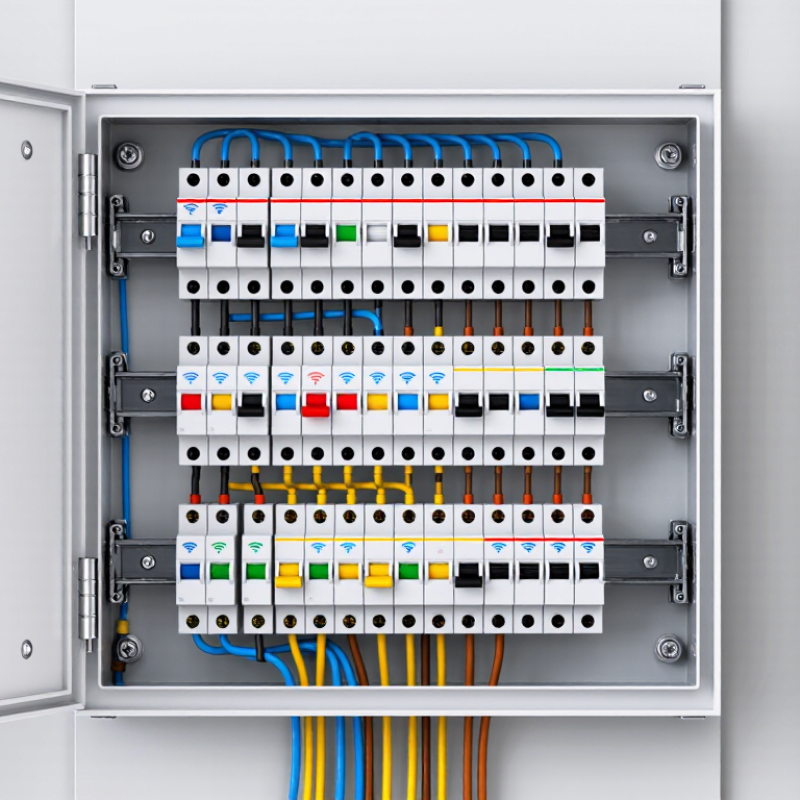
What Is the Best Smart WiFi Circuit Breaker in 2026?

How UL 489 and the 2023 NEC Establish Smart Breaker Safety Benchmarks

What Is the Best Smart WiFi Circuit Breaker in 2026?

A smart WiFi breaker should meet electrical safety requirements before its app features matter. UL 489 covers circuit breakers used in many residential and commercial panels. Its evaluation includes performance under overload and short-circuit conditions. A WiFi connection cannot replace those protections. Check the exact breaker model’s certification, voltage, ampere rating, and interrupting rating—not just the product category.

The 2023 National Electrical Code sets installation benchmarks. Section 110.3(B) requires listed equipment to be installed and used according to its listing and instructions. Article 240 addresses overcurrent protection. Together, these requirements make panel compatibility and installation details essential. A breaker that fits physically may still be unsuitable for a particular panel. Small detail. Big consequence.

The risk is not abstract. NFPA’s Home Electrical Fires report estimates that U.S. fire departments responded to about 24,200 home electrical fires each year from 2015 to 2019. These fires caused an estimated 295 civilian deaths and $1.2 billion in annual direct property damage. A connected breaker may add monitoring or remote control, but those features do not prove safer fault interruption. Ask for verifiable listing information and clear installation instructions. I would also check what happens when WiFi drops; that detail is easy to overlook, and it deserves scrutiny.

What Is the Best Smart WiFi Circuit Breaker in 2026?

How UL 489 and the 2023 NEC establish safety benchmarks

This scope map is not a product rating: “Addressed” means the topic is covered by the standard or code, not that a specific breaker has passed evaluation. UL 489 covers circuit-breaker safety and performance; the 2023 NEC includes requirements such as adequate interrupting ratings and installation in accordance with listing and labeling. Neither provides a universal Wi-Fi performance benchmark, so check a product’s applicable listing and documentation.

Which 120/240-V and 15–60-A Ratings Match Residential Circuits?

A smart WiFi circuit breaker must match the circuit, not just the device you want to control. Most household lighting and outlet circuits use 120 volts, often with 15- or 20-amp breakers. A 240-volt circuit may serve equipment such as a range, dryer, or heat pump, with ratings commonly ranging from 30 to 60 amps. These are examples, not a sizing guide.

Check the existing breaker and the appliance’s nameplate before comparing options. The wire gauge, circuit design, and panel’s approved breaker types all matter. A 20-amp breaker cannot safely replace a 15-amp breaker just because the outlet looks similar. Nor does a 60-amp rating mean “more capable” for an ordinary branch circuit. That assumption can be costly.

Look closely at pole configuration: many 240-volt circuits require a two-pole breaker that disconnects both ungrounded conductors. Some connected devices also need a neutral wire, while others do not. WiFi features are secondary if the breaker cannot fit the panel or communicate reliably from its location. Concrete clue: a panel label and clear photos of the existing wiring help an electrician check compatibility. I would not guess from an online listing alone. A qualified electrician can confirm the circuit rating, wiring, and required protection before installation. One detail is easy to miss. Some panels require specific AFCI or GFCI protection, so verify that too.

What Is the Best Smart WiFi Circuit Breaker in 2026? — Which 120/240-V and 15–60-A Ratings Match Residential Circuits?

Circuit rating Typical residential use Typical voltage and poles Smart-breaker fit Key selection checks
15 A Lighting and general-purpose branch circuits where the wiring and circuit design permit. Usually 120 V, single-pole. A practical choice for monitoring or remotely controlling compatible lighting circuits. Confirm panel compatibility, wire size, and whether the circuit contains loads that should not be remotely switched.
20 A Many kitchen, bathroom, laundry, garage, and general-purpose receptacle circuits, subject to applicable code and circuit design. Usually 120 V, single-pole. Often the most useful rating for smart monitoring of common 120 V branch circuits. Check required GFCI or AFCI protection; the smart breaker must provide the protection required for that location and circuit.
30 A Commonly used for certain electric dryers, water heaters, or other dedicated equipment when specified by the equipment instructions. Often 240 V, two-pole; some equipment may use a different configuration. Suitable only when a compatible two-pole smart model is listed for the panel and the specific load. Verify the appliance nameplate, required conductors, neutral requirements, and any required GFCI protection.
40 A Some ranges, cooktops, or other dedicated 240 V equipment, depending on the manufacturer’s specifications. Typically 240 V, two-pole. A possible choice for a dedicated appliance circuit if the exact smart-breaker model supports this rating and pole configuration. Do not select a rating from appliance category alone; follow the equipment instructions and verify conductor ampacity and panel listing.
50 A Some ranges, cooktops, or other higher-load equipment; actual requirements vary by appliance and installation. Typically 240 V, two-pole. Consider only when the smart breaker is specifically rated for the load and approved for the panel. Check terminal and conductor ratings, required protection, and whether the equipment calls for a dedicated circuit.
60 A Some hardwired equipment, subfeeds, or other dedicated loads when the design and equipment instructions specify this rating. Typically 240 V, two-pole; confirm the exact circuit configuration. A specialized option; availability, monitoring features, and panel compatibility may be more limited than for common 15 A or 20 A circuits. Have a qualified electrician verify the load calculation, conductor sizing, disconnect requirements, and breaker listing.
How to choose: The best smart Wi-Fi circuit breaker is one listed for the exact electrical panel, circuit voltage, pole count, and required protection—not simply the one with the most features. Residential 120/240 V service is commonly split-phase, but individual circuits may be 120 V or 240 V. A breaker’s amp rating must match the circuit design, conductors, and connected equipment. Confirm Wi-Fi requirements, app functions, energy-monitoring accuracy, and local code requirements before purchase; installation should be performed by a qualified electrician.

How UL 1699 AFCI and UL 943 GFCI Protection Compare

What Is the Best Smart WiFi Circuit Breaker in 2026?

A smart breaker’s WiFi features are useful, but protection type matters more. UL 1699 covers arc-fault circuit interrupters, or AFCIs. They detect certain hazardous electrical arcs, such as faults from damaged wiring. UL 943 covers ground-fault circuit interrupters, or GFCIs. These respond to current leaking from its intended path, helping reduce shock risk near sinks, garages, and outdoor areas. Different hazards need different protection.

AFCI and GFCI are not interchangeable. Some circuits may require both types of protection, depending on their location and applicable electrical rules. A smart breaker should clearly identify its protective function and list the relevant safety standard in its documentation. WiFi alerts can show a trip or energy use, but they cannot replace proper certification, correct installation, or a careful inspection. A tripped breaker may also point to a real wiring problem—not just a nuisance.

Tips: Check the panel’s compatibility before buying. Confirm whether you need AFCI, GFCI, or dual-function protection. Ask a qualified electrician to verify the rating and installation. Notifications are handy. They are not a safety test.

What 2.4-GHz Wi-Fi, App Controls, and Energy Monitoring Add

A smart Wi-Fi circuit breaker is only useful when its network, app, and monitoring features fit your home. Many models use 2.4-GHz Wi-Fi, which often reaches farther than 5-GHz signals through walls. Check your router settings before buying; some setup processes require a separate 2.4-GHz network. A strong signal near the electrical panel matters, too. The panel may sit in a garage or utility closet where coverage is weaker.

Tips: Confirm your home network supports 2.4-GHz connections. Check whether the app shows alerts, circuit status, and historical energy use. If readings seem surprising, compare them with your utility meter over several days. Energy estimates can vary, and an app graph is not a precise diagnostic tool.

App controls can make it easier to check a circuit while away, but remote switching should never replace safe electrical practice. Energy monitoring may reveal a device that draws power overnight, or a sudden change worth investigating. Still, data can be confusing at first. I would avoid treating one unusual reading as proof of a fault. Choose a breaker that matches the panel and required electrical ratings, and have a qualified electrician handle installation. The smartest option is not necessarily the one with the most features.

How Panel Fit, Safety Listings, and Total Cost Reveal the Best Choice in 2026

The best smart WiFi circuit breaker in 2026 is not necessarily the one with the longest feature list. Panel fit comes first: check the panel’s exact model, breaker type, amperage, and available space. A breaker that appears to fit may still lack approval for that panel. Ask for written compatibility documentation before buying. That matters.

Safety documentation deserves equal attention. Look for certification from a recognized testing laboratory for the breaker’s intended use, such as UL 489, and confirm installation follows the panel maker’s requirements. NFPA’s Home Electrical Fires report estimated that electrical distribution or lighting equipment was involved in about 34,000 home structure fires annually from 2015 to 2019. The report also recorded an estimated 470 deaths and $1.3 billion in direct property damage each year. Smart monitoring cannot replace correctly rated protection or careful installation.

Compare the full installed cost, not just the online price. Include an electrician’s visit, any required communication hub, subscription fees, and possible panel upgrades. Check whether WiFi reaches the utility area; a metal enclosure can weaken the signal. I would also ask what happens during an internet outage. Monitoring may pause, while ordinary breaker protection should remain available. That distinction is easy to miss. A cheaper option can become costly if it needs extra hardware or does not match the panel. I would verify the paperwork twice, even when the product page looks convincing.

Get a quote
Open chat
1
Hi! How can we help you?
Chat with Pelican Containers